Browse Abandonment Email: How Only One Email Flow Generated $72,000?

Our client, a professional beauty supply brand, earned more than $72,000 in one year by using an automated browse abandonment email flow to turn product viewers into buyers. To achieve that revenue, we set up an automated browse abandonment email flow that reached a 58% open rate, a 7.7% click-through rate, and a 6% order rate.
Below, we explain how we lower the browse abandonment rate for this brand and the key lesson for your own business to apply.
← SWIPE HORIZONTALLY TO VIEW FULL TABLE
| Industry | Professional Beauty Supply |
|---|---|
| Platform | Shopify + email marketing automation |
| Capability | Email marketing automation (browse abandonment email) |
| Client Market | United States and Canada |
| Key Result | 58% open rate7.7% CTR6% order rate$72,000+ email revenue in one year |
The Context & Challenge: Why Did the Brand Need Browse Abandonment Emails?
The brand needed a browse abandonment email flow because their website had high traffic, but the purchase rate had not reached the target.
What is a browse abandonment email?
A browse abandonment email is an automated reminder for shoppers who viewed products but didn’t add to cart. Because it reaches shoppers early in the buying journey, a browse abandonment email reaches more people than most other marketing emails. In Klaviyo’s benchmarks, nearly 48% of automated flow revenue came from new buyers.
Think of it as a shop assistant who noticed which shelf you stopped at and then sent a short note: here’s the item you looked at, plus a few others you might like!
What was the brand’s core challenge?
The brand didn’t have a browse abandonment email flow yet. When setting up this flow for the first time, the brand risked two common mistakes:
- Sending too few reminders. Shoppers often compare prices on other sites before buying, so very few and late reminders can lose the sale.
- Sending too many reminders. Too many messages are one of the main reasons people unsubscribe from marketing emails.
That’s why, after consulting with the brand and diagnosing their concerns, we suggested a browse abandonment email flow designed to avoid both mistakes.
The Solution: How Did We Set Up a Browse Abandonment Email Flow?
We set up a balanced browse abandonment email flow by making sure it does two things:
- Avoids “too few”: it reaches shoppers fast, while their interest is still high.
- Avoids “too many”: it gives shoppers a useful reason to click.
After analyzing the brand’s website data, we built the client’s flow around both sides of that challenge.
We set up the client’s browse abandonment email flow in three steps:
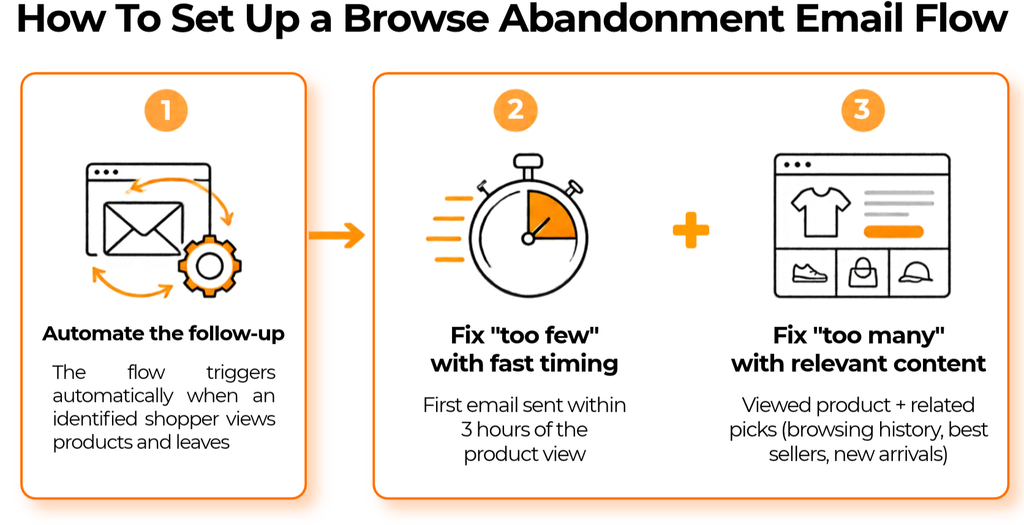
- Automate the follow-up. Based on the brand’s website data, IMP Marketing recommended an automated browse abandonment email flow. The flow triggers on its own every time an identified shopper views products and leaves.
- Fix “too few” with fast timing. IMP Marketing timed the first email in the flow to go out within 3 hours of the product view. Within that window, the shopper’s buying interest is still high before they compare prices elsewhere or forget the product.
- Fix “too many” with relevant content. Each email reminded the shopper about the product they viewed and recommended related products based on their browsing history, the month’s best sellers, or new arrivals.
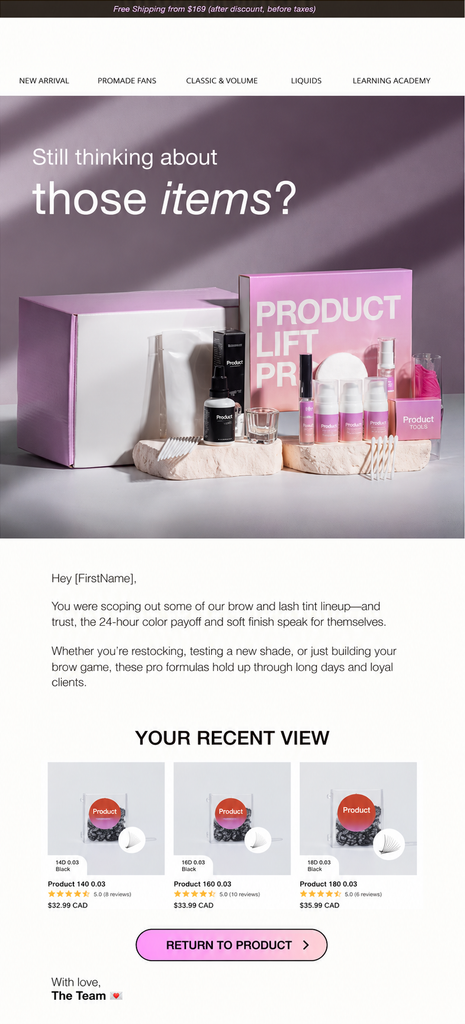
To help you picture how this works in practice, here are the emails from the client’s browse abandonment flow.
The Result: What Did the Browse Abandonment Email Flow Deliver?
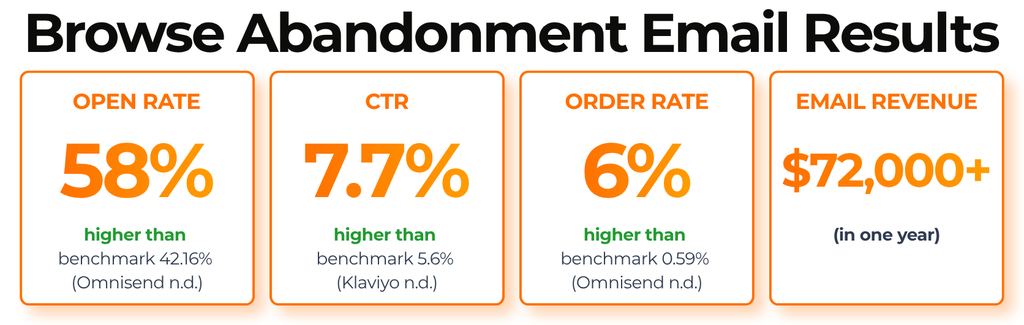
The browse abandonment email flow delivered the client a 58% open rate, a 7.7% click-through rate and a 6% order rate. Over one year, email revenue passed $72,000. The result numbers stand out when you put them next to industry benchmarks for browse abandonment emails.
Want a browse abandonment email flow that brings shoppers back without overwhelming them? Talk to IMP about setting up automated email flows for your store, or see more results in IMP’s eCommerce case studies.
FAQ About Browse Abandonment Emails
What is the difference between a browse abandonment email and an abandoned cart email?
A browse abandonment email goes to shoppers who viewed a product but didn't add it to their cart. An abandoned cart email goes to shoppers who added a product to their cart but didn't check out. Cart abandoners are closer to buying, so each abandoned cart email tends to convert more people. Browse abandoners are a much bigger group, so the browse abandonment email reaches more shoppers overall. Most stores run both emails side by side.
Who can receive a browse abandonment email?
A browse abandonment email can only reach shoppers your store can identify, such as email subscribers or returning customers. If an anonymous visitor views a product, there's no email address to send the reminder to. This means a browse abandonment email works best for stores that already have steady traffic and a growing email list. A store with very little traffic or a tiny list won't see much revenue from this flow yet.
What should a browse abandonment email include?
A browse abandonment email should show the exact product the shopper viewed, with a clear button that takes them back to that product page. Our client's emails also recommended related products based on browsing history, the month's best sellers or new arrivals. Those extra picks give the shopper a second reason to click if the first product wasn't quite right. Keep the email short, because the shopper only needs a reminder, not a full catalog.
How do you measure a browse abandonment email?
You measure a browse abandonment email with four main numbers: open rate, click-through rate, order rate and revenue. Order rate is the share of recipients who placed an order after the email. Email platforms usually count a sale as email revenue when the shopper opened or clicked the email within a set window, such as 5 days by default in Klaviyo. Always check which window your platform uses before you compare your results with benchmarks.